Perché oggi non puoi più fare a meno di un Document Management System
Nelle organizzazioni moderne la gestione documentale non è più solo una questione di cartelle sul server o di qualche file condiviso su un cloud generico. Professionisti e aziende lavorano tutti i giorni con contratti, fatture, dossier clienti, documenti tecnici, verbali e allegati di ogni tipo.
Quando la gestione documenti si regge su cartelle nate “un po’ alla volta”, dischi condivisi caotici e fogli Excel pieni di scadenze, i problemi diventano presto evidenti. Nessuno è sicuro di avere l’ultima versione di un documento, le scadenze importanti vengono dimenticate e ogni ricerca di file costringe a perdere minuti, se non ore, fra sottocartelle e allegati di posta.
Questo tipo di gestione documentale “artigianale” non regge alla crescita. Più aumentano clienti, progetti e contratti, più diventa facile perdere il controllo. Un document management system, cioè un software gestione documentale dedicato, serve proprio a riportare ordine, visibilità e velocità nella gestione documenti e nella gestione contratti.
Il problema della gestione documenti “artigianale”
In molti studi professionali e aziende la gestione documentale nasce senza un vero progetto. Qualcuno crea una struttura di cartelle, qualcun altro ne aggiunge una diversa, spesso con logiche personali. Intanto le scadenze dei contratti e dei documenti a tempo finiscono in fogli Excel personali, appunti sul calendario, email contrassegnate come “da ricordare”.
In questo scenario diventa normale duplicare documenti perché non si trovano gli originali, rifare file già esistenti, cercare per giorni una versione firmata che nessuno sa dove sia finita. La gestione documenti dipende dalle abitudini del singolo, non da un sistema condiviso.
Il risultato è una combinazione di tempo sprecato e rischio operativo, soprattutto per chi gestisce molti contratti o pratiche complesse. È qui che un document management system fa la differenza.
L’impatto su tempo, costi e rischi nella gestione documentale e gestione contratti
Una gestione documentale inefficiente non è solo fastidiosa: ha un impatto diretto su tempo, costi e rischi. Il tempo perso a cercare file, controllare manualmente scadenze, ricostruire la storia di un documento, si somma giorno dopo giorno fino a diventare ore alla settimana.
Sul fronte economico, basta dimenticare una disdetta o non rispettare una scadenza contrattuale per ritrovarsi a pagare canoni non voluti, perdere contributi o dover gestire problemi con clienti e fornitori. Anche il rischio di errori aumenta: usare la versione sbagliata di un documento, perdere un allegato, non avere traccia di chi ha modificato cosa.
Un software gestione documentale ben progettato riduce questi problemi alla radice. Il document management system diventa il punto di riferimento unico per la gestione documenti e per la gestione contratti, con regole chiare e processi ripetibili.
Cos’è un Document Management System (DMS) e cosa fa davvero
Un document management system (DMS) è un software gestione documentale che centralizza e struttura tutto ciò che riguarda i documenti di un’organizzazione. Non si limita a conservare file: li collega a clienti, progetti, pratiche e contratti, ne segue il ciclo di vita e rende la gestione documentale un processo governato, non improvvisato.
In pratica, un DMS gestisce l’intero percorso dei documenti: dall’importazione, all’organizzazione, fino alla ricerca, alla condivisione, alla gestione scadenze e ai rinnovi. Ogni documento entra in un archivio unico e coerente, in cui sai sempre dove trovarlo, a cosa si riferisce, quando è stato caricato o aggiornato.
Definizione di document management system e differenza rispetto a “semplice archivio”
Si potrebbe definire un document management system come un software gestione documentale che organizza e rende ricercabili tutti i documenti aziendali, controllando versioni, permessi, scadenze e collegando i file ai soggetti e ai processi a cui appartengono.
Rispetto a un semplice archivio di file, la differenza è netta. Un archivio ti permette di “mettere via” un documento; un DMS ti permette di governare la gestione documenti: imposti categorie, definisci regole, imposti permessi, colleghi la gestione contratti alle scadenze e ai rinnovi, tieni traccia delle modifiche.
Le funzioni base di un software gestione documentale moderno
Un software gestione documentale moderno offre un archivio centralizzato in cui tutti i documenti di uno studio o di un’azienda vengono organizzati con criteri chiari: per cliente, per fornitore, per progetto, per tipologia di documento. A questo si affianca una ricerca avanzata che consente di filtrare per metadati, per date, per categorie e spesso anche per contenuto del file.
Un buon document management system, inoltre, gestisce le versioni dei documenti, mostra chi ha caricato o modificato cosa e permette di controllare l’accesso tramite ruoli e permessi. In ambito gestione contratti diventa naturale associare scadenze, promemoria e stato di ogni contratto direttamente ai documenti archiviati.
Chi utilizza un DMS: professionisti, studi, aziende, team distribuiti
La gestione documentale avanzata non è un’esigenza solo delle grandi aziende. Liberi professionisti, studi associati, PMI e team distribuiti si trovano spesso a gestire quantità di documenti paragonabili a organizzazioni più grandi, ma con meno tempo da dedicare all’organizzazione.
Un consulente che segue molti clienti, uno studio professionale che gestisce pratiche complesse o un’azienda con più fornitori e contratti attivi traggono tutti vantaggio da un document management system. Cambiano i documenti, non il bisogno: una startup deve organizzare documenti e contratti fin dai primi mesi di attività, uno studio legale deve costruire una data room per i fascicoli delle pratiche complesse, un ufficio acquisti deve tenere insieme contratti fornitori, offerte e listini del dipartimento acquisti. Ovunque ci siano flussi ricorrenti di documenti, la gestione documentale strutturata diventa un alleato quotidiano.
DMS vs cloud storage: perché non basta più solo “mettere i file su Drive”
Quando si parla di gestione documenti, quasi tutti pensano subito a Google Drive, Dropbox, OneDrive o strumenti analoghi. Sono strumenti utili, spesso già presenti in azienda, e rappresentano un ottimo modo per avere file accessibili ovunque: nel confronto tra DocuMap, OneDrive, Google Drive e Dropbox puoi vedere come si posizionano su prezzi e funzionalità di gestione documentale.
Il punto è che questi strumenti nascono come cloud storage: servono a conservare e sincronizzare i file, non a gestire in profondità la gestione documentale e la gestione contratti.
Cosa offrono servizi come Google Drive, Dropbox, OneDrive
I servizi di cloud storage permettono di salvare file online, sincronizzarli su più dispositivi, condividerli tramite link e organizzarli in cartelle. Offrono una ricerca di base, in alcuni casi anche nel contenuto dei documenti, ma l’idea di fondo resta quella di un “filesystem nel cloud”.
Per una gestione documentale avanzata però questo non basta. Manca un vero modello per la gestione contratti, per le scadenze, per i permessi strutturati, per il tracciamento delle modifiche in modo leggibile anche a chi non è tecnico.
Cosa fa in più un software gestione documenti dedicato
Un software gestione documenti e un vero document management system aggiungono uno strato di intelligenza e di processo che lo storage da solo non offre. I documenti non sono più solo file dentro cartelle, ma entità con categorie, collegamenti a clienti o progetti, date di scadenza, stati e responsabilità.
In un DMS puoi cercare un documento sapendo solo che riguarda un certo cliente, una certa tipologia di contratto o un certo periodo. Puoi vedere quali contratti scadono in un determinato mese, quali documenti mancano in una pratica, quali file sono stati aggiornati di recente. La gestione documentale si collega direttamente alla gestione contratti e ai flussi di lavoro reali.
Quando un DMS diventa indispensabile per la gestione contratti e documenti critici
Il passaggio da semplice cloud storage a document management system diventa inevitabile quando il volume di documenti e di contratti supera una certa soglia, oppure quando le conseguenze di un errore diventano troppo rischiose.
Se hai molti contratti con clausole di rinnovo, documenti legati a pratiche con scadenze rigide – come nella gestione dei documenti per bandi e rendicontazioni di finanza agevolata – o dossier che devono essere completi e sempre aggiornati, un DMS è praticamente l’unica soluzione sostenibile. La gestione documentale non è più solo archiviare: è garantire che ogni informazione sia disponibile, corretta e in tempo.
Le caratteristiche chiave di un buon software gestione documentale
Non tutti i software gestione documentale sono uguali. Alcuni si limitano a replicare le funzioni di uno storage nel cloud con qualche etichetta in più, altri offrono una vera gestione documentale avanzata.
La prima caratteristica da cercare in un document management system è una ricerca avanzata che funzioni davvero. Non basta filtrare per nome file: deve essere possibile trovare un documento sapendo a quale cliente è associato, di che tipo è, quando scade, quali parole contiene.
Un secondo elemento essenziale è la categorizzazione coerente. Un buon software gestione documenti deve permettere di definire categorie chiare – ad esempio “contratti”, “fatture”, “documenti tecnici”, “documenti legali” – e di applicarle in modo omogeneo, meglio ancora se con l’aiuto di automatismi.
Sul piano della governance, sono fondamentali la gestione delle versioni, il tracciamento delle modifiche e la definizione di permessi granulari per utenti e team. Un document management system serio tiene traccia di chi ha fatto cosa e consente di decidere chi può vedere o modificare determinati documenti.
Per chi si occupa di gestione contratti, la capacità di gestire scadenze e rinnovi direttamente nel software gestione documentale è un requisito chiave. Un DMS deve permettere di impostare date di scadenza, promemoria e, dove possibile, integrare queste informazioni con il calendario, così da ridurre al minimo il rischio di dimenticanze.
Infine c’è il tema della collaborazione e delle integrazioni. Workspace dedicati per clienti o team, possibilità di condividere in modo controllato solo le informazioni necessarie, collegamenti tramite API con i software già in uso: tutto questo rende la gestione documentale parte del flusso di lavoro, non un’attività a sé stante.
Come un DMS accelera il lavoro di professionisti e aziende
Introdurre un document management system non è un esercizio teorico: ha conseguenze molto concrete sul modo in cui professionisti e aziende lavorano ogni giorno.
Quando la gestione documentale è strutturata, il tempo speso a cercare documenti si riduce drasticamente. Non è più necessario ricordare in quale cartella è finito un file, né chiedere ai colleghi di rinviare allegati che si sono persi per strada. La combinazione di categorizzazione e ricerca avanzata porta rapidamente al documento giusto.
Anche la gestione contratti cambia volto. Le scadenze non sono più disperse tra fogli di calcolo e calendari personali: vivono all’interno del document management system, collegate ai documenti stessi. Questo rende più difficile dimenticare una disdetta o un rinnovo, e più facile avere una visione di insieme su ciò che sta per scadere.
La riduzione di errori, duplicati e documenti smarriti è la conseguenza naturale di una gestione documentale avanzata. Se tutti usano lo stesso software gestione documenti e lo stesso archivio intelligente, le probabilità di lavorare su versioni diverse dello stesso file si riducono notevolmente. In questo senso, il DMS è uno strumento che migliora qualità, non solo efficienza.
Gli esempi pratici potrebbero essere molti: dal consulente che gestisce decine di clienti con pratiche diverse, all’azienda che deve tenere in ordine i contratti con i fornitori, fino al team che lavora su un progetto complesso con documentazione condivisa. In tutti questi scenari, un document management system ben impostato rende la gestione documentale più semplice e affidabile.
DocuMap come Document Management System avanzato per documenti e contratti
All’interno di questo quadro, DocuMap si propone come un document management system pensato specificamente per la gestione documentale e la gestione contratti di professionisti e aziende. Non è un semplice spazio di archiviazione nel cloud, ma un software gestione documentale che integra automazione, ricerca avanzata e controllo delle scadenze.
DocuMap nasce proprio dalla frustrazione di chi perde tempo fra cartelle disordinate, file smarriti e contratti dimenticati. L’obiettivo è trasformare la gestione documenti in un processo lineare, in cui ogni file trova il suo posto fin dal primo momento e in cui le scadenze non sono più un esercizio di memoria.
DocuMap come software gestione documentale specializzato nella gestione contratti
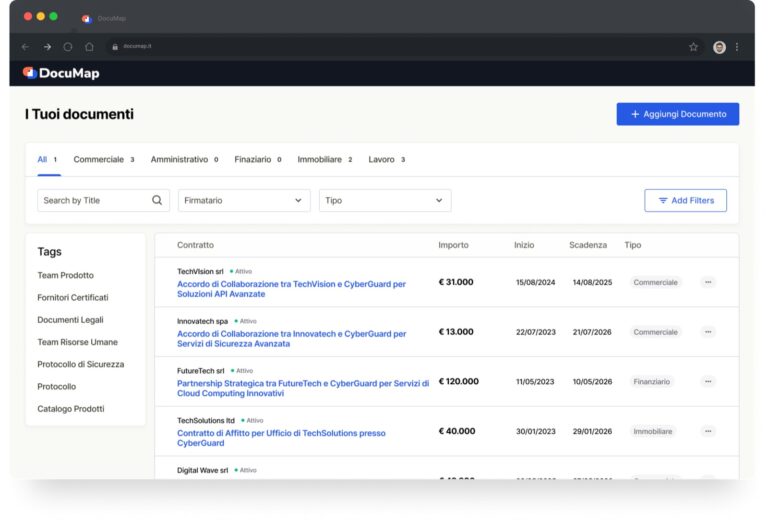
In DocuMap, la gestione documentale e la gestione contratti convivono nello stesso ambiente. I documenti possono essere organizzati per cliente, fornitore, progetto o pratica, e i contratti possono essere collegati a scadenze, rinnovi e avvisi.
Il software gestione documentale diventa così anche uno strumento pratico per chi deve mantenere il controllo sui rapporti contrattuali. Invece di tenere un elenco separato di contratti, tutto vive all’interno del document management system: documenti, metadati, scadenze e responsabilità.
L’AI specializzata e proprietaria di DocuMap per l’analisi dei documenti
Uno degli aspetti che distingue DocuMap da molti altri software gestione documentale è l’uso di AI specializzata e proprietaria per supportare la gestione documentale: un software di gestione documentale con AI non si limita a conservare i file, ma ne legge il contenuto e lo interpreta.
Quando carichi documenti e contratti, l’AI di DocuMap li analizza e riconosce di che tipo di file si tratta, quali informazioni contiene e come può essere categorizzato. Questo rende molto più rapida l’organizzazione iniziale, soprattutto quando si importano grandi volumi di documenti da archivi esistenti.
La gestione documenti non è più fatta tutta a mano: la categorizzazione automatica e l’analisi dei documenti alleggeriscono gran parte del lavoro di archiviazione e riducono gli errori.
Categorizzazione automatica di documenti e contratti e archivio intelligente
La categorizzazione automatica è uno dei cuori di DocuMap come document management system. Puoi definire categorie coerenti con il tuo lavoro – ad esempio “clienti”, “fornitori”, “contratti”, “documenti amministrativi” – e lasciare che il software gestione documentale utilizzi l’AI per assegnare automaticamente i documenti alle categorie corrette.
In questo modo, l’archivio diventa un vero archivio intelligente. La gestione documentale avanzata non richiede ore di lavoro manuale: i documenti vengono letti, interpretati e organizzati, e tu puoi concentrarti sulle attività più importanti.
Ricerca avanzata, scadenze sotto controllo e workspace per clienti e team
DocuMap integra una ricerca avanzata che sfrutta sia le categorie sia il contenuto dei documenti. Cercare per cliente, tipologia, data o parola chiave diventa una questione di secondi.
La gestione contratti è supportata da un sistema di scadenze e promemoria che permette di avere sempre sotto controllo rinnovi, disdette e date critiche. È possibile sincronizzare le scadenze con il calendario, così da integrare la gestione documentale con l’agenda quotidiana.
I workspace per clienti e team consentono di creare aree di lavoro dedicate, in cui condividere solo i documenti necessari e assegnare permessi specifici. Questo è particolarmente utile per chi lavora con molti clienti o con team interni ed esterni allo stesso tempo.
Sicurezza, privacy e integrazioni API con gli altri software che usi
Dal punto di vista della sicurezza, DocuMap è progettato per garantire backup, protezione dei dati e controllo sugli accessi. L’AI specializzata e proprietaria lavora all’interno dell’ecosistema DocuMap, senza condividere dati verso l’esterno: i documenti rimangono sempre tuoi.
Le integrazioni tramite API permettono di collegare il document management system agli altri software che usi ogni giorno, dai gestionali ai CRM. In questo modo il software gestione documentale non rimane isolato, ma si inserisce nel flusso complessivo dei processi digitali.
Quando ha senso scegliere DocuMap come DMS
Arriva un momento in cui la gestione documentale “di fortuna” non è più sostenibile. Se ti riconosci in scenari in cui i documenti sono sparsi fra Drive, email e cartelle locali, se le scadenze dei contratti vivono in un foglio Excel gestito da una sola persona o se hai già subito problemi per documenti mancanti o contratti non disdetti in tempo, probabilmente è il momento di passare a un document management system.
DocuMap è stato pensato proprio per chi vuole fare questo passo con uno strumento concreto, senza doversi occupare di progetti IT complessi. Nel primo mese di utilizzo puoi importare i documenti principali, lasciare che l’AI specializzata e proprietaria li analizzi e li categorizzi, impostare le categorie più importanti per la tua attività e mappare le principali scadenze di contratti e documenti a tempo.
Il risultato è una gestione documentale avanzata che non richiede competenze tecniche particolari: il software gestione documentale si occupa dell’organizzazione, tu continui a lavorare con i contenuti.
FAQ: le domande più frequenti su Document Management System e DocuMap
In questa sezione trovi alcune risposte rapide alle domande più comuni su document management system, gestione documentale, gestione contratti e su come DocuMap ti aiuta a organizzare documenti e contratti in modo semplice e strutturato.
Che differenza c’è tra un document management system e un cloud storage come Google Drive o Dropbox?
Un cloud storage serve soprattutto a conservare e condividere file. Un document management system è un software gestione documentale che aggiunge categorizzazione, ricerca avanzata, permessi, gestione scadenze e funzioni di gestione contratti. Non è solo uno spazio, è un sistema che governa la gestione documenti e il loro ciclo di vita.
Un software gestione documentale è utile anche a studi e piccoli team?
Sì. Anche realtà piccole hanno spesso molti documenti critici. Un software gestione documenti riduce il tempo perso a cercare file, migliora la gestione documentale dei fascicoli clienti e aiuta a tenere sotto controllo scadenze e rinnovi, soprattutto nella gestione contratti.
Come aiuta un DMS nella gestione contratti?
Il document management system permette di collegare a ogni contratto le sue informazioni chiave e le sue scadenze. Invece di gestire tutto in fogli separati, la gestione contratti avviene dentro il software gestione documentale, con avvisi e promemoria integrati e collegati direttamente ai documenti archiviati.
In cosa si distingue DocuMap rispetto ad altri software gestione documentale?
DocuMap utilizza AI specializzata e proprietaria per analizzare i documenti, categorizzarli automaticamente e supportare una gestione documentale avanzata. È pensato per professionisti e aziende che vogliono una gestione contratti e una gestione documenti più ordinate, con scadenze sotto controllo, archivio intelligente e workspace per clienti e team.
L’AI di DocuMap è sicura per i miei documenti e contratti?
Sì. L’AI di DocuMap è specializzata e proprietaria e lavora nel rispetto di sicurezza e privacy: i tuoi documenti rimangono tuoi, non vengono condivisi verso l’esterno. Il software gestione documentale è costruito per proteggere i dati, non per esporli.
Quanto tempo serve per iniziare a usare DocuMap come document management system?
Il setup è rapido. In pochi minuti puoi creare il tuo account su DocuMap, impostare categorie di base, importare i primi documenti e lasciare che l’AI specializzata e proprietaria inizi a organizzare la tua gestione documentale. Da lì, ogni nuovo documento entra in un flusso coerente di gestione documenti e gestione contratti.
Inizia ora – organizza documenti e contratti con DocuMap
Se vuoi smettere di perdere tempo tra cartelle disordinate, Excel infiniti e scadenze dimenticate, è il momento di passare a un document management system pensato per la tua attività. DocuMap è il software gestione documentale che usa AI specializzata e proprietaria per aiutarti a tenere sotto controllo la gestione documenti e la gestione contratti, con un archivio intelligente e scadenze sempre visibili.
Puoi provarlo con una prova gratuita illimitata e senza scadenza, carta di credito non richiesta, e iniziare a riorganizzare il tuo archivio in pochi minuti.